
Blocks Overview
Commerce Connect provides a complete toolkit of 37 WordPress® blocks for building e-commerce experiences. These blocks integrate BigCommerce product data with WordPress®‘s block editor, giving you granular control over your storefront’s layout and functionality.
Block Categories
Section titled “Block Categories”Product Display Blocks (7)
Section titled “Product Display Blocks (7)”| Block | Purpose | Use Case |
|---|---|---|
| Product Title | Display product name | Single product pages, product cards |
| Product Images | Product photo gallery | Single product pages, image carousels |
| Product Pricing | Display price, sale price, discounts | Product pages, product cards |
| Product Description | Display product description | Single product pages |
| Product Buy Button | Add to cart button | Product pages, quick-buy widgets |
| Product Rating | Star rating + average + count | Product pages, product listings |
| Single Product | Complete product card | Product grids, featured products |
Product Collections Blocks (9)
Section titled “Product Collections Blocks (9)”| Block | Purpose | Use Case |
|---|---|---|
| Products | Main product grid/list container | Shop page, category pages |
| Products Grid | Grid layout for product cards | Shop page, category pages |
| Products Count | Display result count | Above product grid |
| Products Sort Control | Sort dropdown (price, name, date) | Above product grid |
| Products Filters | Complete filter system container | Shop sidebar |
| Products Filter Control | Individual filter controls | Shop sidebar filters |
| Products Filter Selections | Active filter tags | Show applied filters |
| Products Search Box | Search input field | Header, shop page |
| Products Search Label | Search result label | Above search results |
Reviews Blocks (6)
Section titled “Reviews Blocks (6)”| Block | Purpose | Use Case |
|---|---|---|
| Product Reviews | Parent container for reviews system | Single product pages |
| Product Reviews Form | Submit new review | Reviews section |
| Reviews Summary* | Overall rating stats and distribution | Reviews section header |
| Reviews Sort* | Sort control (newest, highest rated) | Reviews section |
| Reviews List* | Individual review cards display | Reviews section |
| Reviews Load More* | Pagination/infinite scroll | Reviews section |
*Child blocks that only appear inside Product Reviews parent block
Account Blocks (7)
Section titled “Account Blocks (7)”| Block | Purpose | Use Case |
|---|---|---|
| Account | Parent container for customer account pages | My Account dashboard |
| Account Login | Customer login form | Login page, header login widget |
| Account Registration | Customer registration wizard | Sign up page |
| Account Menu | Account navigation menu | My Account sidebar |
| Account Addresses* | Manage shipping/billing addresses | Account dashboard |
| Account Details* | Edit customer profile | Account dashboard |
| Orders* | View order history | Account dashboard |
*Child blocks that only appear inside Account parent block
Category Blocks (5)
Section titled “Category Blocks (5)”| Block | Purpose | Use Case |
|---|---|---|
| Categories | Category grid/list display | Shop landing page |
| Category | Single category display | Category page template |
| Category Title | Category name heading | Category page header |
| Category Description | Category description text | Category page header |
| Category Details Template | Category page template | Full category page layout |
Utility Blocks (3)
Section titled “Utility Blocks (3)”| Block | Purpose | Use Case |
|---|---|---|
| Cart Icon | Shopping cart icon + count | Header navigation |
| Related Products | ”You may also like” suggestions | Product page footer |
| Search Tabs | Tab navigation for search results | Search results page |
Block Organization by Page Type
Section titled “Block Organization by Page Type”Homepage / Shop Landing Page
Section titled “Homepage / Shop Landing Page”- Categories block for category grid
- Products block for featured products
- Products Search Box in header
Category Pages
Section titled “Category Pages”- Category Title and Description
- Products Filters for sidebar
- Products Grid for product display
- Products Sort Control for sorting
Single Product Pages
Section titled “Single Product Pages”- Product Images (gallery)
- Product Title (H1 heading)
- Product Pricing (price display)
- Product Rating (star rating)
- Product Description (product details)
- Product Buy Button (add to cart)
- Product Reviews (reviews section with child blocks)
- Related Products (related items)
My Account Pages
Section titled “My Account Pages”- Account block (parent container)
- Account Details (child)
- Account Addresses (child)
- Orders (child)
- Account Menu (navigation sidebar)
- Account Login (login form)
- Account Registration (sign up form)
Header / Navigation
Section titled “Header / Navigation”- Cart Icon (cart widget)
- Products Search Box (search field)
- Account Login (login link/form)
Parent-Child Block Relationships
Section titled “Parent-Child Block Relationships”Account Block Hierarchy
Section titled “Account Block Hierarchy”Account (parent)├── Account Details (child)├── Account Addresses (child)└── Orders (child)These child blocks only appear inside the Account parent block and provide customer account functionality.
Product Reviews Block Hierarchy
Section titled “Product Reviews Block Hierarchy”Product Reviews (parent)├── Reviews Summary (child)├── Reviews Sort (child)├── Reviews List (child)└── Reviews Load More (child)
Product Reviews Form (insertable, can be standalone or inside parent)The reviews system uses the Interactivity API for dynamic client-side behavior. Summary, Sort, List, and Load More work together as coordinated children.
Plugin Templates
Section titled “Plugin Templates”Commerce Connect provides 2 core WordPress® templates that enable Full Site Editing (FSE) for product pages:
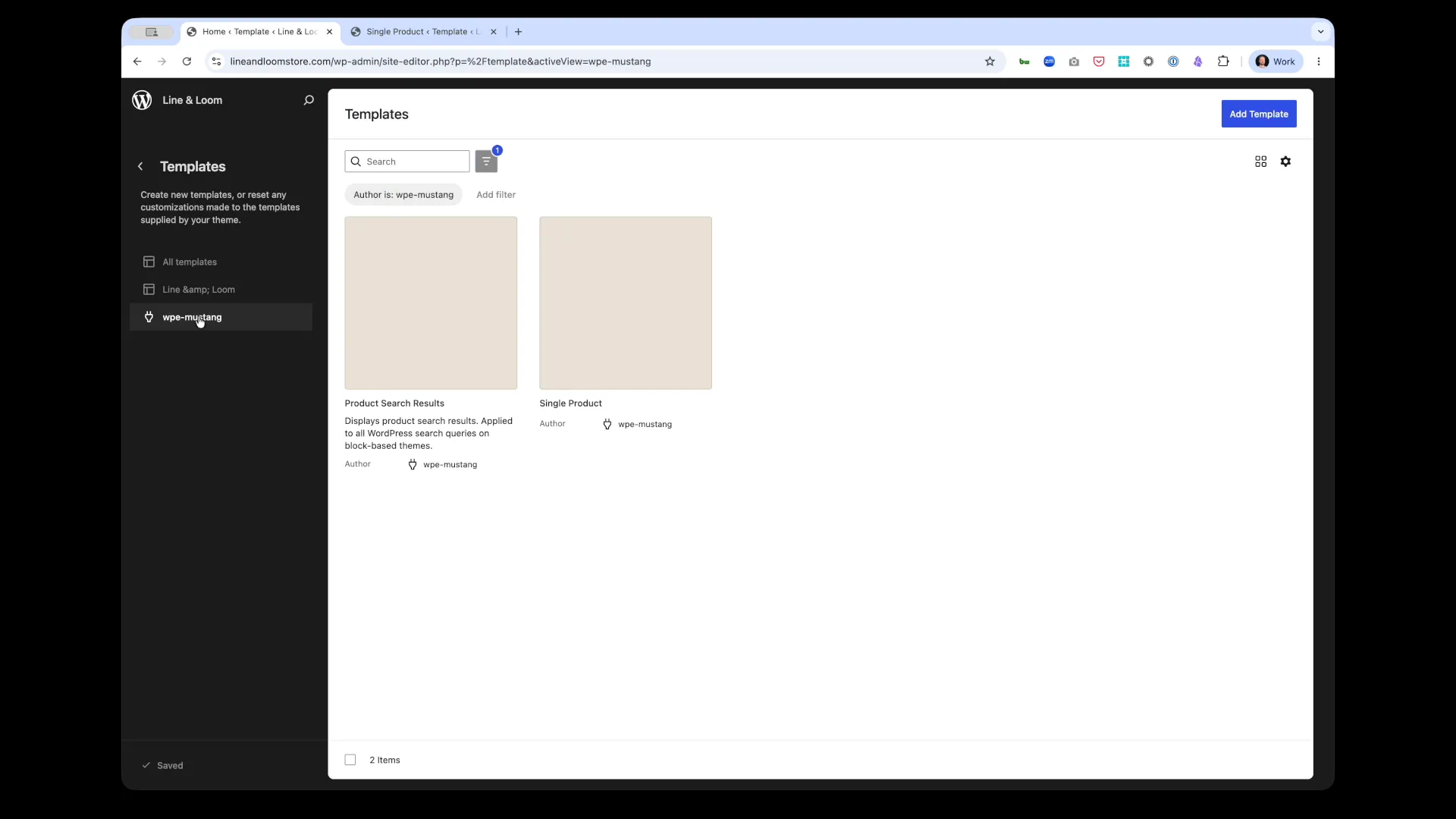 Commerce Connect’s 2 core templates: Single Product and Product Search Results
These templates appear in WordPress®‘s Site Editor under the “Author is: wpe-mustang” filter and provide the foundation for building product page layouts using blocks.
Learn more:
- Templates Overview - Complete guide to both templates
- Product Search Results Template - Customize search results pages
- Single Product template - Customize product detail pages
Block Features
Section titled “Block Features”Composable Architecture
Section titled “Composable Architecture”Mix Commerce Connect blocks with regular WordPress® blocks (text, images, columns, videos) to create content-rich shopping experiences.
Granular Control
Section titled “Granular Control”Every block includes settings panels with options for:
- Layout controls (columns, spacing, alignment)
- Display toggles (show/hide elements)
- Style settings (colors, typography, borders)
- Content settings (which products, categories, filters)
- Advanced settings (custom CSS classes)
Data Sync
Section titled “Data Sync”Product blocks display data synced from BigCommerce. When you update pricing, inventory, or product details in BigCommerce, those changes automatically sync to WordPress® via webhooks.
WordPress® Ecosystem Compatibility
Section titled “WordPress® Ecosystem Compatibility”Commerce Connect blocks work with:
- Full Site Editing (FSE) themes
- Yoast SEO for product pages
- Advanced Custom Fields (ACF) for custom product data
- WordPress®‘s native block editor
Next Steps
Section titled “Next Steps”- Getting Started with Blocks - Add your first blocks to a page
- Block Customization Guide - Customize block appearance and behavior
- Individual Block Documentation - Detailed guides for each block
Related Documentation
Section titled “Related Documentation”- Product Sync - How BigCommerce data syncs to WordPress®
- Site Editor Guide - Using blocks in the WordPress® Site Editor
-
- Creating custom blocks